
A stolen phone is serious. A stolen phone in the hands of someone who also saw or learned its passcode is a different kind of emergency. The passcode is not merely the code that opens the screen. On many phones, it can help authorize sensitive changes, reveal saved information, open email and messaging apps, or reach account-recovery paths.
The thief may have watched you enter the code in a crowded place, recorded it over your shoulder, persuaded you to reveal it, or threatened you. Once the device and its unlocking secret are together, you should shorten your response timeline and secure the accounts that control everything else.
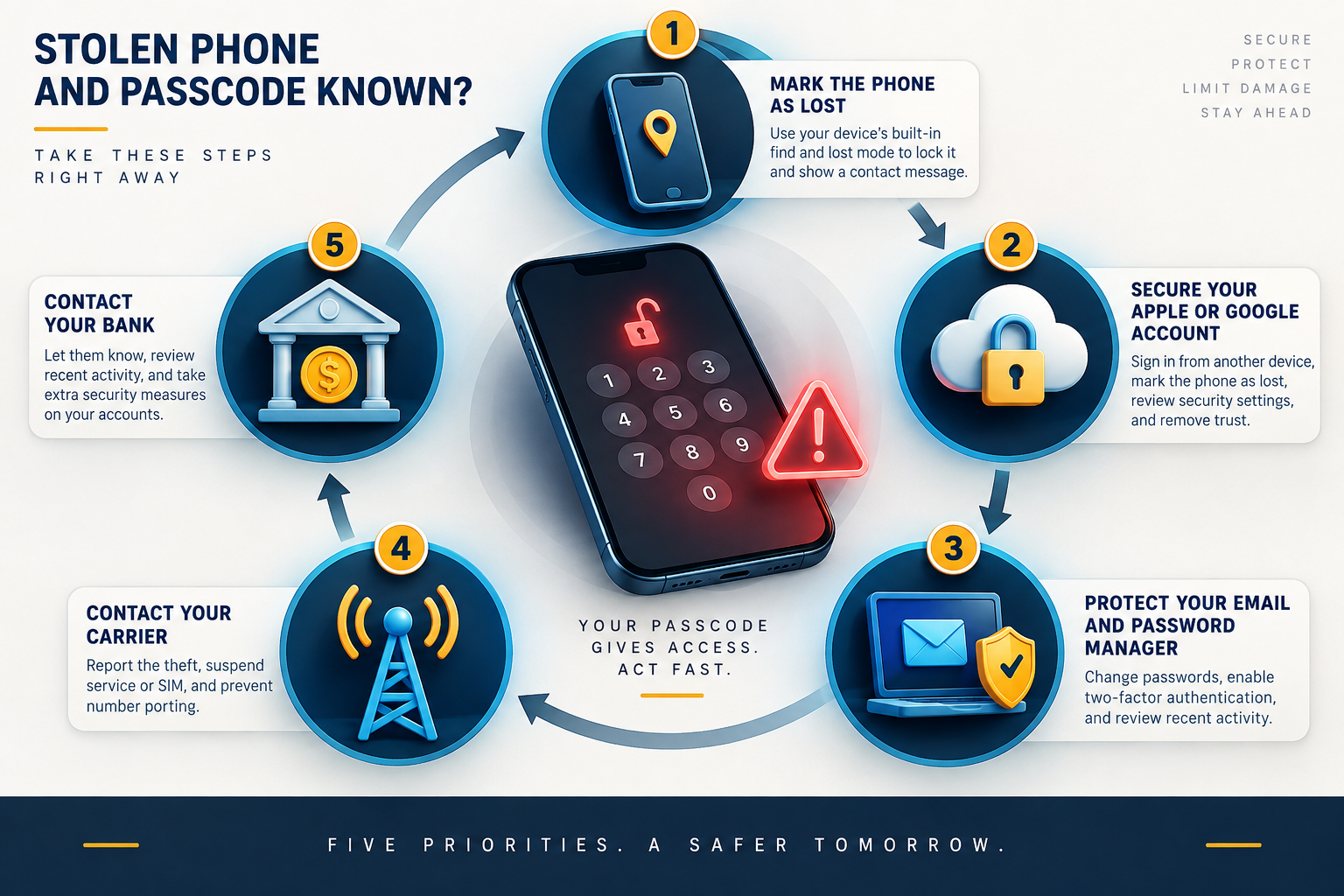
Get physically safe first. Do not confront or follow a thief based on a location marker. Then use another trusted device to mark the phone as lost, protect your primary accounts, contact the carrier and financial institutions as needed, and decide whether remote erasure is appropriate.
Why a known passcode changes the risk
A locked phone normally creates a barrier between the thief and the data on the device. Knowing the passcode can weaken that barrier. Exactly what becomes possible depends on the phone model, operating-system version, security settings, apps, and whether extra protections were enabled.
The danger is not limited to photos or messages. Consider what the phone can reach:
- the email inbox used to reset other passwords;
- text messages and authentication prompts;
- a password manager or saved browser passwords;
- banking, payment, shopping, and cryptocurrency apps;
- cloud storage, private documents, and identity records;
- work chat, virtual private network access, and company data;
- recovery phone numbers, trusted-device approvals, and account settings;
- contacts who may trust messages sent from your real number or accounts.
A thief does not need every one of these paths. One successful password reset or account takeover can create a chain. That is why the response should protect the “control accounts”—primary email, Apple or Google account, password manager, mobile number, and financial services—before less important apps.
Step 1: move to safety and use a trusted device
If the phone was taken during a confrontation, prioritize your safety and contact local emergency services when appropriate. A map pin is not an invitation to recover the device yourself. Location can be delayed, imprecise, or inside a building where you cannot safely identify the phone.
Use a device you trust to start recovery. A family member’s or colleague’s device may be suitable if you use a private browsing session, avoid saving passwords, sign out fully, and clear the session afterward. A managed computer at work may require help from IT.
Write down the approximate time and place of theft, device model, phone number, serial number or IMEI if available, and the last known location. Keep screenshots of relevant account or tracking activity. Do not expose recovery codes or passwords in those screenshots.
Step 2: mark the phone as lost immediately
For an iPhone, use Find My or iCloud.com/find and mark the device as lost quickly. For a stolen device, Apple advises against putting your contact details in the Lost Mode message. Do not remove it from the Find My list: that removes Activation Lock, including after remote erasure.
The Apple Account device list is a different control. Apple’s account-review instructions allow removing the stolen device from your account without removing it from Find My. Read the exact control and warning before confirming; do not treat these two lists as interchangeable. If you have AppleCare+ with Theft and Loss, check the claim instructions before making removal changes.
For Android, use Google’s device-finding service, currently called Find Hub in Google’s support materials, to locate, secure, or erase an eligible device. Available actions depend on whether the phone has power, connectivity, location, and the relevant account features enabled.
If the thief knows the passcode, act even when the tracker shows the phone offline. A remote command may take effect when it reconnects, but your account work should not wait.
Step 3: secure the account that controls the phone
Open the Apple Account or Google Account through its official site or app on a trusted device. Review security activity, trusted devices, recovery methods, and recent changes. Change the account password when the passcode exposure or account activity makes unauthorized access plausible.
Review the account’s device list and security settings while preserving the stolen iPhone’s Find My entry. On other platforms, follow the provider’s exact stolen-device guidance rather than assuming that every “remove device” button has the same effect.
Apple’s Stolen Device Protection is designed for the case where someone has an iPhone and knows its passcode. When enabled, it can require Face ID or Touch ID without a passcode fallback for specified sensitive actions, and it can add a security delay to certain account or device changes. It is valuable, but do not assume it was enabled or that it protects every app and every piece of data.
On any platform, review unfamiliar devices after changing credentials. A thief may have added a trusted device, passkey, recovery method, or session before you responded.
Step 4: protect primary email and the password manager
Your primary email account is often the reset channel for dozens of other services. Change its password if necessary, sign out other sessions, and inspect recovery addresses, forwarding rules, filters, delegates, connected apps, and sent mail. Follow our prioritized guide to securing a compromised email account.
If the phone could open your password manager, secure that account next. Change its master password when exposure is credible, revoke the lost device or session, and follow the provider’s emergency guidance. Then focus on the most consequential credentials stored there: email, financial accounts, the mobile carrier, workplace accounts, and identity services.
Do not try to change every low-value password at random. Work in an order that closes recovery routes first. Keep a checklist so panic does not lead to repeated work or missed accounts.
Step 5: contact the mobile carrier
Tell the carrier the phone was stolen and that the unlock passcode may be known. Ask it to suspend service or protect the line, and discuss replacing the SIM or eSIM. Ask what identification is required before changes can be made to the account.
Secure the carrier-account PIN or password, especially if it was stored on the device. A criminal who controls the number may receive calls or texts used for verification. Moving important accounts away from SMS-based recovery can reduce that dependency, but make changes carefully so you do not lock yourself out during the incident.
Record the carrier case number and the time of your call. If the number is restored to a replacement phone, test calls and messages and review whether any account-recovery notices arrived during the gap.
Step 6: call banks and payment providers
Contact financial institutions through numbers printed on cards, official apps, or independently verified websites. Do not use a number texted to you after the theft. Explain that the phone and passcode may be compromised, freeze or restrict cards and wallets where appropriate, and review recent transactions.
Remove or suspend payment cards from the lost device using the platform’s official controls. Also review shopping apps, peer-to-peer payment services, cryptocurrency wallets, and any service that keeps a balance or can charge a saved card.
If identity documents, tax records, or financial statements were accessible, consider the identity-theft reporting and credit-protection options in your country. In the United States, the Federal Trade Commission’s IdentityTheft.gov provides a recovery plan.
Step 7: tell your employer when work access is involved
A personal phone can still hold work email, chat, authentication prompts, or a managed profile. Contact IT or security promptly. Give them the approximate theft time, device type, phone number, whether the passcode was known, and any suspicious prompts you observed.
The organization may be able to revoke sessions, remove the device from management, wipe a work profile, reset authentication methods, or monitor for misuse. Do not hide the passcode detail out of embarrassment; it materially changes the response.
Remote erase: when to consider it
Remote erasure can protect data, but it can also affect tracking and evidence. The right time depends on the sensitivity of the information, likelihood of recovery, available platform protections, insurance requirements, and guidance from law enforcement or an employer.
If the thief knows the passcode and the phone contains high-risk data, the case for erasing sooner is stronger. Read the platform’s current instructions before acting. Confirm that important backups exist when possible, and understand what the erase command will do if the phone is offline.
Erasing a device is not the same as removing it from your account. On Apple devices, removing the device from the account can remove Activation Lock. Keep these actions separate in your mind and follow official guidance.
Expect follow-up phishing after the theft
Someone may text or email claiming the phone was found, that your cloud account will be locked, or that you must click a link to see its location. The link may imitate an Apple, Google, carrier, or police page and ask for credentials or the device passcode.
Do not enter account credentials through a message link. Check location and recovery status only through the platform’s official app or a manually opened site. Apple specifically warns users never to share the device passcode or account verification codes.
Contacts may also receive requests for money or codes from your real number or messaging account. Warn close contacts through another channel. Tell them not to trust urgent requests until they verify your identity independently.
If the phone is recovered
Recovery of the hardware does not prove that nothing changed. Before resuming normal use, check the device for unfamiliar accounts, management profiles, accessibility services, apps, forwarding settings, biometrics, passkeys, and configuration changes. Review account activity again.
If the device was out of your control while the passcode was known, consider a factory reset after preserving necessary evidence and confirming backups. Install the latest supported operating system, set a new passcode that is not reused elsewhere, re-enroll biometrics, and restore only trusted apps and data.
Change any secret that was visibly stored in notes, photos, messages, or files. Assume that a recovery code displayed in plain text may have been copied even if it remains on the phone.
Reduce the damage before a theft happens
- Use a longer passcode that is difficult to observe and shield the screen when entering it.
- Enable Find My or the Android device-finding feature and test how to reach it from another device.
- Turn on platform anti-theft protections, including Stolen Device Protection on supported iPhones.
- Use strong screen-lock and automatic-lock settings.
- Limit sensitive notification previews on the lock screen.
- Use unique account passwords and phishing-resistant MFA where available.
- Keep secure, tested backups and store recovery codes away from the phone.
- Record the serial number and carrier contact details somewhere you can reach without the device.
- Know how to contact your employer’s security team and your financial institutions.
Our broader lost-or-stolen phone checklist covers the standard response. The crucial addition when the passcode is known is speed: treat local access as a possible route into your online identity, not just the contents of one device.
The recovery order to remember
Safety comes first. Then mark the phone lost, protect the Apple or Google account, secure email and the password manager, contact the carrier and banks, alert your employer, and evaluate remote erasure. Review devices and recovery methods throughout the process.
A passcode seen by a thief turns a hardware loss into a potential account-control incident. Respond in layers. Lock the device, close the reset routes, revoke unauthorized sessions, and distrust follow-up messages that try to obtain the final secret the thief still needs.
Accuracy update: October 3, 2026 — separated Apple Account removal from Find My removal and added the stolen-device contact-message caveat.