A message can look familiar and still be unsafe. It may use the name of your bank, show a delivery company’s logo, arrive inside an existing conversation, or mention a real purchase. None of those details proves that the sender is genuine. The safest response is to pause, separate the claim from the message, and verify it through a route you already trust.
This 12-point check is designed for emails, text messages, WhatsApp messages, direct messages, and unexpected account alerts. You do not need to find every warning sign before deciding not to interact. One serious inconsistency can be enough to stop, while the absence of obvious mistakes is never a guarantee that a message is safe.
Start by protecting the decision, not examining the link
When a message creates urgency, many people begin by tapping the link to “see what it is.” That is already a decision made inside the sender’s environment. A safer first step is to leave the message untouched. Do not reply, scan an attached QR code, open a document, call the displayed number, or approve a sign-in request while you are still evaluating the claim.
Take a screenshot if you may need to report the message later, but avoid sharing a screenshot that exposes a verification code, account number, address, or another person’s information. If the message claims to be from an organization you use, open that organization’s app independently or type its known address yourself. The message should not choose your verification route.
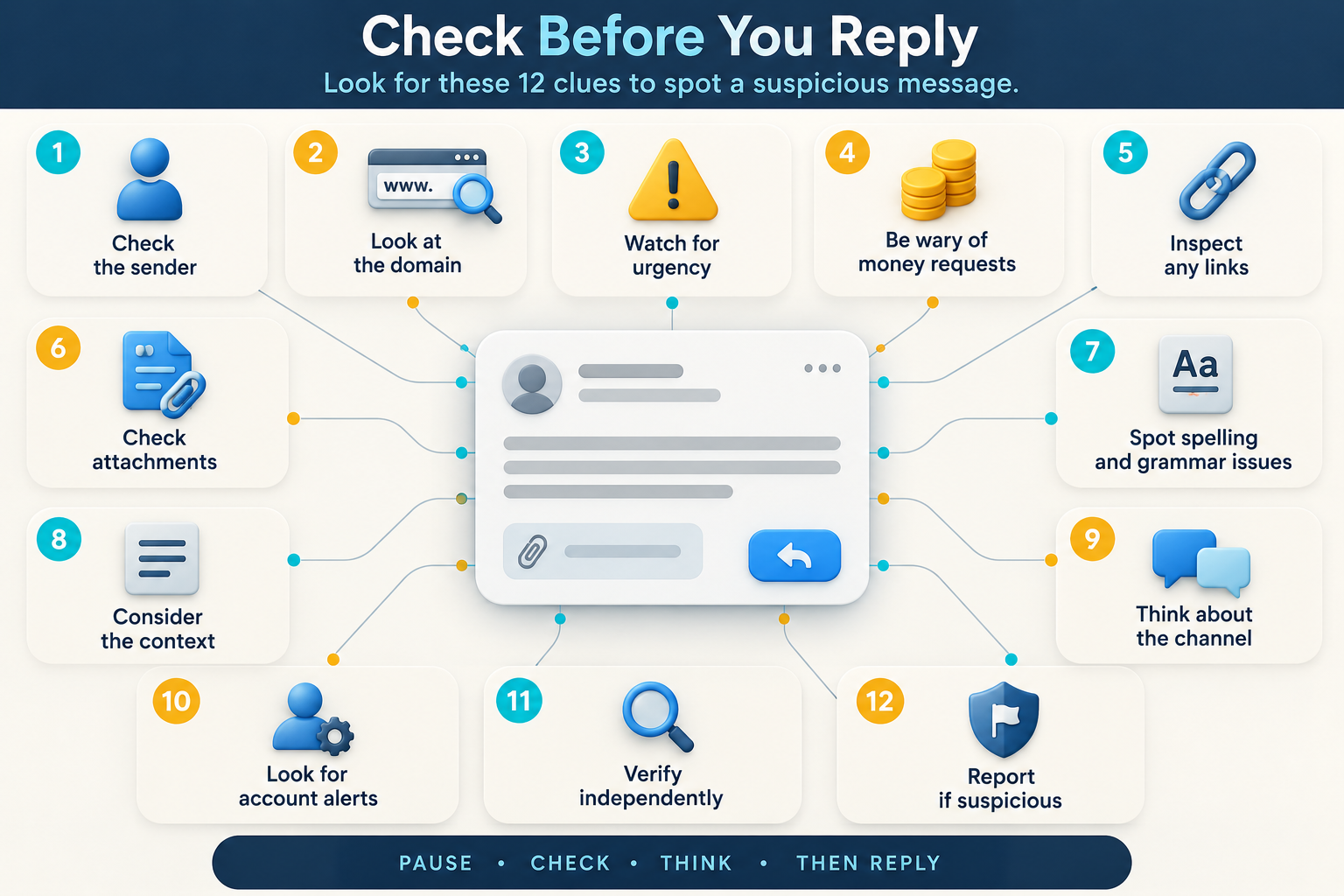
A 12-point check for suspicious messages
1. Was the contact expected?
An unexpected message is not automatically fraudulent. Delivery companies send legitimate updates, banks flag unusual activity, and services sometimes require account action. Still, an unexpected request deserves more verification because you did not initiate the conversation.
Ask what event should have caused the message. Did you place an order? Did you try to sign in? Did you ask for a password reset? If nothing matches, do not let the message manufacture an explanation for itself. Open the official account directly and check whether the same alert appears there.
2. Is the message trying to control your time?
Scam messages often make delay sound dangerous. They may claim that an account will close today, a parcel will be returned within hours, a payment must be made immediately, or a relative needs money before anyone else is contacted. Urgency narrows attention and discourages independent checking.
A real deadline can exist, but a genuine organization should still allow you to verify it through its official app, website, statement, or published telephone number. Treat pressure to act before checking as a warning about the process, even when the underlying event sounds possible.
3. What exact action does the sender want?
Look past the story and identify the requested action. Are you being asked to enter a password, send a code, approve a prompt, install an app, provide card details, move money, buy a gift card, scan a code, or call an unfamiliar number? The action usually reveals more than the branding.
A short message such as “Is this you?” may seem harmless, but replying can confirm that a number is active and that the recipient is willing to engage. A fake delivery notice may ask for only a small fee, yet the real objective can be collecting card information. State the request in plain words before deciding.
4. Can you verify the claim without using anything in the message?
This is the most useful practical test. If a bank reports a failed payment, use the bank’s saved app. If a retailer mentions an order, open your order history from a bookmark or a manually entered address. If a colleague requests a document, contact them through a channel you already used before.
Do not call the telephone number printed in the suspicious message merely to ask whether the message is genuine. A scammer who controls the message also controls that number. Independent verification means choosing contact details from a card, statement, official app, saved contact, or independently located website.
5. Does the sender address match the claimed organization?
Display names are easy to imitate. An email may say “Account Security” while coming from an unrelated address. Expand the sender details and read the complete address, including everything after the @ symbol. On a text message, remember that a familiar sender label can sometimes group unrelated messages or be spoofed depending on the network and service.
A correct-looking address is useful evidence, but it is not conclusive. Real accounts can be compromised, lookalike characters can be difficult to notice, and a message may be sent through a legitimate service abused by a scammer. Use the address as one part of the check, not as permission to proceed.
6. Where does the link actually lead?
Visible link text can differ from the destination. On a computer, hovering may reveal a destination without opening it. On a phone, a long press may show a preview, but behavior differs by app and an accidental tap is possible. If examining the destination feels risky or unclear, skip it and verify through the official account instead.
Read the registered domain from right to left around the final dot-separated name. A long address containing a company name at the beginning can still belong to a different domain near the end. HTTPS and a padlock only mean that the connection to that site is encrypted; they do not prove that the site belongs to the company being copied.
7. Is the message asking for a secret that a real support agent should not need?
Passwords, one-time codes, backup codes, passkey approvals, card PINs, and recovery codes are authentication secrets. A person who obtains them may be able to act as you. Genuine support staff should not need you to read out a one-time sign-in code or approve a login that you did not start.
Pay close attention when the message says a code is needed to “cancel” a transaction or “verify” your identity. The code may actually authorize a password reset, device enrollment, or payment. Read the code’s own warning text instead of accepting the caller’s explanation.
8. Is the payment method difficult to reverse?
Payment instructions can expose the true nature of a message. A supposed employer asking you to deposit money first, a government office demanding gift cards, or a seller insisting on cryptocurrency should trigger a stop. Wire transfers, gift cards, cash deposits, and cryptocurrency transfers can be difficult or impossible to recover once sent.
Do not assume a small first payment makes a scheme safe. Some task scams and fake jobs pay a small amount to establish trust before demanding a larger deposit. Judge the arrangement by why you are being asked to pay and how the payment is protected, not by whether an earlier transaction succeeded.
9. Does the story fit what the real organization normally does?
A logo can be copied; a process is harder to imitate consistently. Think about how the organization normally communicates. Does your bank usually place secure notices inside its app? Does the delivery company ask for address corrections through its official tracking page? Does your employer request payroll changes through a verified internal system?
Past experience is helpful, though procedures can change. When a message introduces a new process, confirm it independently. The question is not whether the design looks professional. It is whether the requested path matches a process the real organization can confirm outside the message.
10. Is the language trying to prevent outside advice?
Secrecy is a serious warning sign. A scammer may tell you not to speak with a bank employee, family member, manager, police officer, or technical-support team because they would supposedly delay the solution. Impersonation scams sometimes frame secrecy as loyalty or protection.
Pause and involve someone who is not emotionally inside the conversation. For workplace requests, use the organization’s reporting process. For a family emergency, contact the relative or another family member through a known number. A genuine emergency does not become less genuine because you verified who is asking.
11. Does the message contain personal details that merely prove data was available?
Your name, address, employer, recent purchase, or part of an account number can make a message convincing. Those details may come from public profiles, data breaches, discarded documents, shared contacts, or an account that was already compromised. Personalization shows that the sender knows something; it does not establish who the sender is.
Be especially careful when accurate information is used to rush you into revealing a missing piece. A caller may know the first digits of a card and ask for the rest. A message may quote an old password and claim to control your device. Verify the claimed access rather than treating known data as proof.
12. What happens if you do nothing for ten minutes?
This final question interrupts pressure. Most legitimate account problems can survive the time needed to open an official app, call a published number, or ask another person. If the sender says any delay will cause immediate harm, that claim itself needs independent confirmation.
Use the ten minutes to preserve evidence, inspect your official account, and decide what category the incident fits. If the message concerns an active bank transfer, stolen phone, or account takeover, act promptly—but act through the real service. Urgent recovery and rushed obedience are not the same thing.
How to interpret the result
A checklist does not produce a mathematical scam score. Some genuine messages are poorly written, and some fraudulent messages are polished. Instead, place the situation into one of four practical outcomes.
Probably routine but independently verified: The same notice appears inside the official account, the details match your activity, and no unexplained request remains. You can handle the issue from the official account rather than returning to the original link.
Unverified: The claim could be real, but you cannot confirm it. Do not engage until you can reach the person or organization through a trusted route. Uncertainty is a reason to wait, not a reason to “test” the sender.
Likely attempted scam: The message combines an unverified identity with pressure, secrets, unusual payment, or a destination controlled by the sender. Report it through the messaging service and the relevant organization, then block it where appropriate.
Possible compromise already in progress: You see an unfamiliar session, changed recovery information, an unauthorized transaction, sent messages you did not write, or a login approval you did not initiate. Move from message checking to account recovery immediately.
If you already interacted, respond to what you exposed
Replying without sharing information is different from entering a password. Opening a page is different from installing software. Sending a card number is different from approving a sign-in. Recovery should match the action rather than treating every click as proof that the whole device is hacked.
If you entered a password, go directly to the real service, change that password, sign out unfamiliar sessions, and review recovery details. Change reused copies of the same password elsewhere. If you supplied a one-time code or approved a prompt, assume the attempted login may have succeeded and inspect active sessions and security events.
If you disclosed payment information or sent money, contact the financial provider through its official channel as soon as possible. Ask what can be frozen, disputed, recalled, or replaced. If you installed an app or opened an attachment that may have installed software, disconnect from sensitive work, update the device’s security tools, and follow the platform or organization’s incident process.
Keep copies of the message, sender details, time, payment references, and any pages you reached. Do not keep reopening the suspicious link to collect better evidence. Reporting routes differ by country, and financial loss or identity misuse may require local law-enforcement or identity-theft reporting.
What this check cannot prove
No visual checklist can certify a message as safe. A real contact’s account may be stolen. A legitimate website may contain a compromised advertisement. A convincing phone call may use information gathered elsewhere. Technical controls also differ between email providers, messaging apps, mobile networks, and workplaces.
The purpose of the check is narrower and more useful: it keeps the suspicious sender from controlling the verification process. When the claim is real, you can usually resolve it through the official service. When it is false, leaving the message prevents many common forms of harm.
A small prevention routine that helps later
Save official apps and important contact numbers before an emergency. Use unique passwords and enable multi-factor authentication, preferably a phishing-resistant option such as a passkey or security key when an important service supports it. Keep devices and browsers updated, and review recovery email addresses and phone numbers periodically.
Finally, decide on a household or workplace verification habit. It might be calling back on a known number, using a family phrase that is not posted online, or requiring a second person to confirm unusual payment requests. The best time to agree on that process is before a frightening message arrives.
Choose the next check based on what happened
For a closer look at the delivery method, compare phishing, smishing, and QR-code phishing. If you already opened the destination, use the suspicious-link response guide instead of guessing that every click caused the same harm. A message from someone you know still needs care because a stolen account can turn an existing relationship into the sender’s credibility.