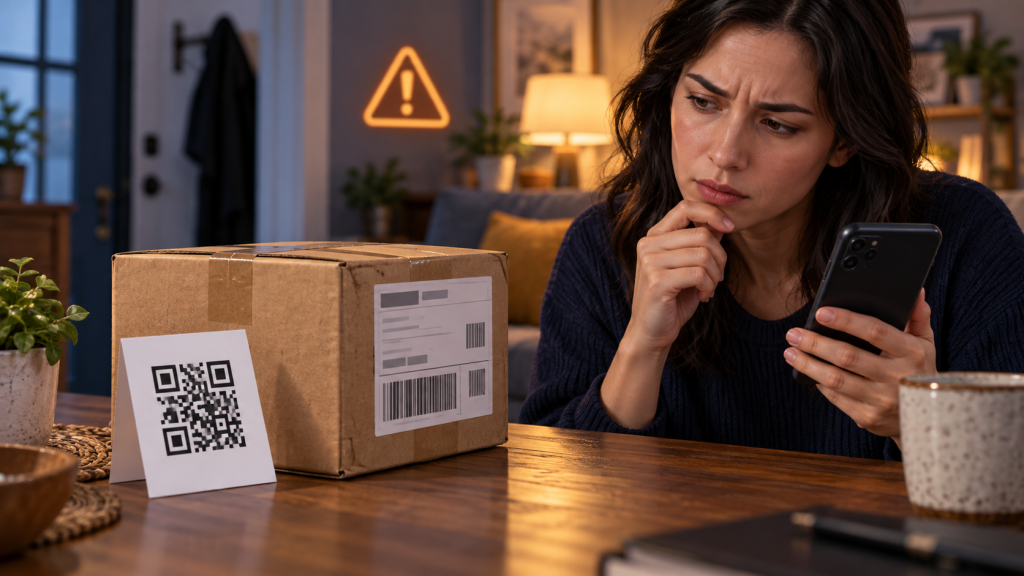
A small package arrives in your name. You did not order it. Inside is an inexpensive item and a card that says, “Scan to find out who sent your gift,” “Confirm delivery,” or “Register for a reward.” The mystery is the hook. The QR code is designed to make curiosity feel like verification.
Do not scan it. A code can open a phishing site, start a download, lead to a fake support conversation, or ask for payment and identity details. The package itself may be part of a brushing scheme, in which merchandise is sent to create fake order activity or reviews, or it may exist mainly to deliver the QR code. Diagnose the shipment without letting the sender choose your digital route.

The first five actions
- Do not scan, call, or visit information printed inside. Do not use a phone number, email address, social account, or shortened web address supplied by the card.
- Keep the packaging while you investigate. Photograph the outside label, tracking number, return address, postage, contents, and card. Redact your address before sharing an image.
- Check recent orders independently. Open shopping, marketplace, gift-registry, and delivery accounts through their known apps or saved addresses.
- Ask likely gift senders through a separate channel. Describe the item without sending the QR code. A real giver should not need your password or payment information.
- Review payment activity. Check cards and shopping accounts for an unauthorized order, a new delivery address, or an unfamiliar saved payment method.
Why the QR code is more useful to the scammer than a printed link
A printed web address gives you something readable. A QR code hides the destination until a device interprets it. It also moves the interaction from paper to the phone, where the screen is smaller and a full domain may be harder to inspect.
The code can lead to different stages:
- a page asking for a shopping or email login;
- a form collecting name, address, date of birth, or card details;
- a small “redelivery” or “verification” payment;
- an app, profile, or browser-extension installation;
- a fake survey followed by a recurring subscription;
- a support number that begins a remote-access scam.
The FTC and U.S. Postal Inspection Service have specifically warned about QR codes included with unexpected packages. The surrounding physical object makes the request feel more credible, but it does not make the destination safer.
Brushing and quishing are related but not identical
In a traditional brushing scheme, a seller or intermediary ships a low-cost item to a real address, then uses an account or order record to post a fake positive review or inflate sales. The recipient did not buy the product. The package can indicate that someone has the name and address, but it does not by itself prove that the recipient’s shopping account was hacked.
Quishing uses a QR code as the phishing route. An unexpected parcel can combine both: the shipment creates a plausible transaction, and the card tries to collect more valuable information. The right response considers each layer separately.
- Physical layer: What carrier, tracking number, postage, and return information appear?
- Account layer: Does any real order, gift, payment, or address change match?
- digital layer: What does the card ask you to do, and can the claim be verified without it?
What the shipping label can tell you
A label may show the carrier, service class, tracking number, origin facility, return address, merchant code, or marketplace logistics identifier. Enter a tracking number only in the carrier’s official app or website that you opened independently. Do not assume the printed return address identifies the real sender; it may be a warehouse, fulfillment partner, forwarding point, stolen identity, or false address.
Check whether the parcel is actually addressed to you. If it belongs to a neighbor or previous resident, follow the carrier’s misdelivery process and do not open or scan anything. If it uses your name and address, preserve the label as part of the report.
Check every plausible legitimate explanation
Before concluding that an account was breached, look for:
- a gift purchase by a friend or family member;
- a delayed subscription box or replacement order;
- a marketplace seller sending a missing component;
- a warranty replacement arranged earlier;
- a promotional sample you knowingly requested;
- a split shipment under a different merchant name.
Verify through your order history and known contacts. Do not create an account on the card’s site merely to check.
Review shopping and email accounts for unauthorized activity
Open each relevant marketplace or retailer directly. Check orders, archived orders, cancellations, addresses, payment methods, gift-card balances, memberships, reviews, and signed-in devices. Search the email inbox for genuine order confirmations, but remember that an attacker with email access can delete or hide them.
If you find an unauthorized order, change the account password, end unknown sessions, review recovery information, and contact the retailer through its official help route. Replace any reused password on other accounts. Tell the payment provider about an unauthorized charge using the number on the card or its trusted app.
If there is no matching order or charge, the package may have been funded by the sender. Continue monitoring, but do not assume your card details were stolen solely because the parcel arrived.
Your name and address may come from many places
Names and delivery addresses appear in public records, marketing lists, data-broker databases, old breaches, social posts, discarded labels, seller records, and previous transactions. The package confirms that the sender could associate a name with a deliverable address. It does not reveal the source.
Use the event as a reason to review account security and exposed public information, but avoid making unsupported claims about which company leaked it. If the package includes more sensitive information—an account number, private order, or current financial detail—document that difference and notify the relevant provider.
Do not contact the sender through the card
A reply can confirm that the address reaches a curious person. A fake return process may ask for a card to cover postage, a login to generate a label, or a photo of identification. Use the carrier, marketplace, or postal inspection service instead.
If a legitimate merchant name appears, reach its official website from a trusted search or prior receipt. Give the tracking number and ask whether it belongs to a real order. Do not grant remote access so “support” can inspect your account.
Can you keep or discard the item?
Rules for unsolicited merchandise and mail handling vary by country and carrier. In the United States, federal consumer and postal guidance generally says recipients do not have to pay for unordered merchandise, but use the current official guidance for your location.
Do not consume unexpected food, medicine, supplements, cosmetics, or liquids. Be cautious with batteries, chargers, electronic storage, USB devices, and products that could be unsafe or counterfeit. Ask the carrier or local authority how to handle a leaking, threatening, or hazardous package. Do not connect an unknown USB device to a computer.
Do not post a review for the item
A card may offer a gift card, refund, or replacement in exchange for a five-star review. Even when the QR destination is not a credential-stealing page, the request can manipulate a marketplace’s review system. Do not let the package create a transaction or opinion that did not exist.
If a review already appears in your name, capture it and report it to the marketplace. Review the account for unknown orders, devices, addresses, and profile changes. Ask the platform to explain whether the review came from your account or from a seller record that only used your identity.
If the package contains an invoice or debt demand
Do not pay merely because the notice arrived with a physical item. Compare the invoice with actual orders, contracts, and card statements. Contact the named business through a verified address. A genuine merchant should be able to identify the order without asking for a password, verification code, or remote access.
Keep the invoice when reporting, because account numbers, payment instructions, and company details may help a marketplace, postal inspector, or bank connect the package to a broader campaign. Do not publish the complete document online.
How to report the package
Report through the marketplace if the label identifies one, the delivery carrier’s official fraud route, and the national postal inspection or consumer-protection service where appropriate. Provide photographs, tracking details, the date, the contents, and whether the QR code was scanned or information was submitted.
In the United States, the U.S. Postal Inspection Service has online reporting options for mail-related scams, and the FTC accepts fraud reports. Other countries have their own postal and cybercrime reporting services.
If you scanned but did not open the destination
Many phones show a preview before opening a QR destination. If you stopped at the preview, record the displayed domain without visiting it. Close the scanner. Update the phone and do not install a QR “cleanup” app.
A scan alone is not always the same as loading the website. The behavior depends on the camera or scanner. Check the browser history and downloads to determine whether a page actually opened or a file arrived.
If the page opened
Close it and check for downloads, website notification permission, new browser tabs, and installed apps or profiles. If nothing was entered, approved, or installed, the response may end with updates, a legitimate security scan, and monitoring.
Use the suspicious-link recovery guide to match the response to the deepest action rather than assuming every scan has the same result.
If you entered a password, code, or payment information
From a trusted device, change the affected password and every reused copy. End unknown sessions, inspect recovery methods, and review connected apps. If you approved a sign-in or device-linking code, revoke that session explicitly.
Contact the card issuer or bank through a verified route. Explain exactly what you entered and whether a charge was authorized. Watch for follow-up calls claiming to be the fraud department; a scammer may use the details you just supplied to sound convincing.
If personal identifiers were submitted, use the identity-theft recovery guidance for your country. Preserve the page address, time, fields, and transaction identifiers.
Expect a follow-up story
The next contact may claim that the gift must be returned, your account was charged, the item is part of an investigation, or a refund is waiting. It may use the correct item and address because the attacker already knows them. Verify every new claim independently.
The broader phishing, smishing, and quishing guide explains why a physical code is still only a delivery mechanism.
A safe conclusion to the mystery
You do not need to learn who sent the item before refusing the QR code. Preserve the package details, check real orders and payments, verify likely gifts separately, secure any affected accounts, and report through official channels. Curiosity is not evidence—and the code is not a trusted answer.